
A website without a meta description is a site that never told Google what to say under its link, so Google builds the snippet from page text instead, which on a new site can be a cookie notice, a menu label or "Add to cart". You find them by checking each homepage's source for a description tag, and you sell the fix by writing the missing line for the owner before they have paid you anything.
For an SEO freelancer, a web designer or a small agency, it is one of the easiest openings there is. It takes a minute to check, the owner can see the problem for themselves in a Google search, and on a brand new site it almost always comes with a few other gaps worth paid work.
Why does a missing meta description cost a business clicks?
The meta description is one line of HTML in the page's head: a meta tag with name="description" and a content value holding the sentence itself, for example "Handmade oak furniture, built to order in Leeds. Free delivery within 30 miles."
Visitors never see it on the page. They see it in search results, under the blue title, and often in the preview when someone shares the link in a chat app. It is the owner's one sentence of sales copy before anyone has clicked.
When it is missing, Google writes the snippet itself from whatever text it finds on the page. On an established site with plenty of copy that can work fine. On a new site it often goes badly, because the first text on the page is a cookie banner, a "Skip to content" link, a free shipping bar or the words "Your cart is empty". That snippet is what a searcher reads when deciding whether to click.
Two things are worth being straight about, because owners and other SEOs will raise them:
- It is not a ranking factor. Google has said for years that it does not use the description in ranking, and its documentation on controlling search result snippets treats it only as a source for the snippet. A missing description will not push a site down the results.
- Google can ignore it. Even a good description is sometimes replaced when Google thinks other text on the page fits the search better.
So the pitch is about clicks and first impressions: the business chooses what a stranger reads about it in search, instead of leaving it to a cookie notice. The timing helps too. A business in its first week online has not hired an SEO person yet, its pages are only starting to be indexed, and the owner is still checking how the site looks in Google. Fixing the snippet now means the right words are there from the first impression onward.
Which sites are most likely to have no meta description?
There is no search engine that lets you type "sites with no meta description" and get a list. Meta tags are not searchable that way. What you can do is pick a pool of sites that are likely to be missing one, then check each homepage fast. New sites are the best pool by a long way, because the description is one of the settings people skip when they rush a launch.
The certificate logs
Every site that serves HTTPS gets a certificate, and since 2018 Chrome has expected each new certificate to be published in public Certificate Transparency logs. A site often appears there before it has visitors. A free search site such as crt.sh lets you look up certificates by domain, or by a word in the domain such as "bakery" or "plumbing", and sort the results by date. Broad keyword searches can be slow or time out.
What it takes: patience. The logs are huge, and most new certificates belong to test servers, mail servers, parked domains and subdomains of big companies. You will open many dead or empty pages for each real business.
Launch sites: Product Hunt and BetaList
Product Hunt lists new products every day and BetaList lists startups before or around launch. Both give you a name, a link and usually the founder's profile.
The catch is that these are mostly software and apps. If you sell SEO to local shops, salons or online stores, you will find few of them here. Founders on these sites also tend to know about meta tags already, so the hit rate for this particular gap is lower.
Launch posts on social media
Small business owners announce their new site on LinkedIn, Instagram, Facebook groups and Reddit. Searching phrases like "our new website is live" or "just launched our store" on LinkedIn, or browsing a local business group, turns up sites from people who are still excited about them and happy to talk.
It is slow going, though. There is no way to sort by date reliably on every platform, and groups often have rules against pitching inside them. Use the post to find the site, then contact the business directly.
Newly indexed pages on Google
Google's search tools let you limit results to the past week or past 24 hours. Searching a niche and a place, for example "dog grooming" Manchester with the time filter on, surfaces pages Google dates to the last day or week. This is also where the missing description shows itself: look at the snippet. If it reads like a menu, a cookie banner or a jumble of product names, the page probably has no description.
Bear in mind the time filter goes by the date Google gives a page, not by when the business started, so you will also see old sites with a fresh blog post.
A crawler over your own list
Once you have a list of sites from any of the sources above, an SEO crawler such as Screaming Frog (its free version crawls up to 500 URLs) will report every page with a missing or empty meta description in one pass. Paste the homepages in list mode then open the Meta Description tab and filter by Missing.
It only checks the list you give it, so it does not find new sites for you.
| Source | What you get | Cost | Main limit |
|---|---|---|---|
| Certificate logs (crt.sh) | Brand new domains, often before launch | Free | Mostly noise: test servers, parked pages |
| Product Hunt, BetaList | Named products with founders | Free | Mostly software, founders who know SEO |
| Social launch posts | Owners who just announced a site | Free | Slow, hard to sort by date |
| Google with a time filter | Recently dated pages, with their snippets | Free | Old sites with new pages mixed in |
| SEO crawler over a list | Every missing description in one pass | Free up to 500 URLs | Needs a list to start from |
What does the page source tell you about its description?
For one site at a time, any of these works:
- View the source. Press Ctrl+U (Cmd+Option+U on a Mac), then search the page for
name="description". No match means no description. A match withcontent=""means it is empty, which counts the same. - Run Lighthouse. In Chrome, open DevTools, go to Lighthouse, tick SEO and run it. A missing description shows as "Document does not have a meta description".
- Search the site in Google. Type
site:example.comand read the snippet for the homepage. A snippet that reads like navigation is a strong hint, though not proof, since Google sometimes rewrites good descriptions too.
Two traps cause false positives:
- Descriptions added by JavaScript. Some sites built as single-page apps insert the tag after the page loads. View source will not show it, but the Elements panel in DevTools will. Google can usually read these, so do not pitch a site that has one.
- Placeholder descriptions. A description that exists but says nothing, such as the theme's default line or the store name repeated, is not missing. It is still a fair thing to mention, but say "your description is the theme's default", not "you have none". Getting this wrong in a cold email ends the conversation.
Check the homepage first. If the homepage has no description, the inner pages often have none either, and that is the bigger job.
Is the site with no description a new business or an old, parked one?
A missing description on a parked domain or a site that closed in 2021 is worth nothing to you. Before you write, run these checks:
- The domain's age. Look it up at the registry with an RDAP or WHOIS lookup. A creation date this week or this month means it is new. Ten years old means you are looking at an old business with a new page, which is a different pitch.
- The first certificate. On crt.sh, the earliest certificate for the domain is a good sign of when the site first went live on HTTPS. A domain registered years ago with its first certificate last week is a real launch.
- It loads and it is finished enough. The homepage loads, has real text about real products or services, and is not a "coming soon" page or a template with lorem ipsum.
- It is a business. It sells something or offers a service, and names who runs it or where. A personal blog, a hobby project or a holding page from the registrar is not a lead.
- There is a way to reach someone. An email address, a named owner, or at least a social profile you can find from the site.
As of 27 November 2026, this filter is most of the work. On 26 November we checked 478,083 sites, and in the 24 hours to the morning of 27 November, 1,906 new businesses reached our feed. Most of what appears in the logs on any day is not a business you could ever pitch.
Which other launch settings get skipped along with the description?
A site that skipped the meta description usually skipped other launch settings too. Listing two or three of them turns a five-minute favour into a small paid job. These are the gaps you can confirm from the homepage alone:
| Gap | What people see | What it costs the business |
|---|---|---|
| No meta description | Google writes the snippet from menus, banners or cart text | Fewer clicks from people who did find it in search |
| No social preview image | A shared link shows a blank box or a random image | Shares in chats and on social media look unfinished |
| No structured data | Google has no labelled facts about the business, products or prices | Fewer chances at rich results such as product details in search |
| No favicon | A blank or default icon in browser tabs and some search results | The site looks unfinished next to competitors' tabs |
| Images with no alt text | Screen readers say nothing useful, and image search has no words to go on | Lost image search traffic and a worse experience for some visitors |
| Old copyright year | A footer that says 2022 on a site launched this week | Visitors wonder whether the business is still running |
| Pages loading over plain http | "Not secure" in the browser bar on some pages | Visitors, especially buyers, leave before trusting it |
| Slow on mobile | A long wait on a phone | Visitors give up before the page loads |
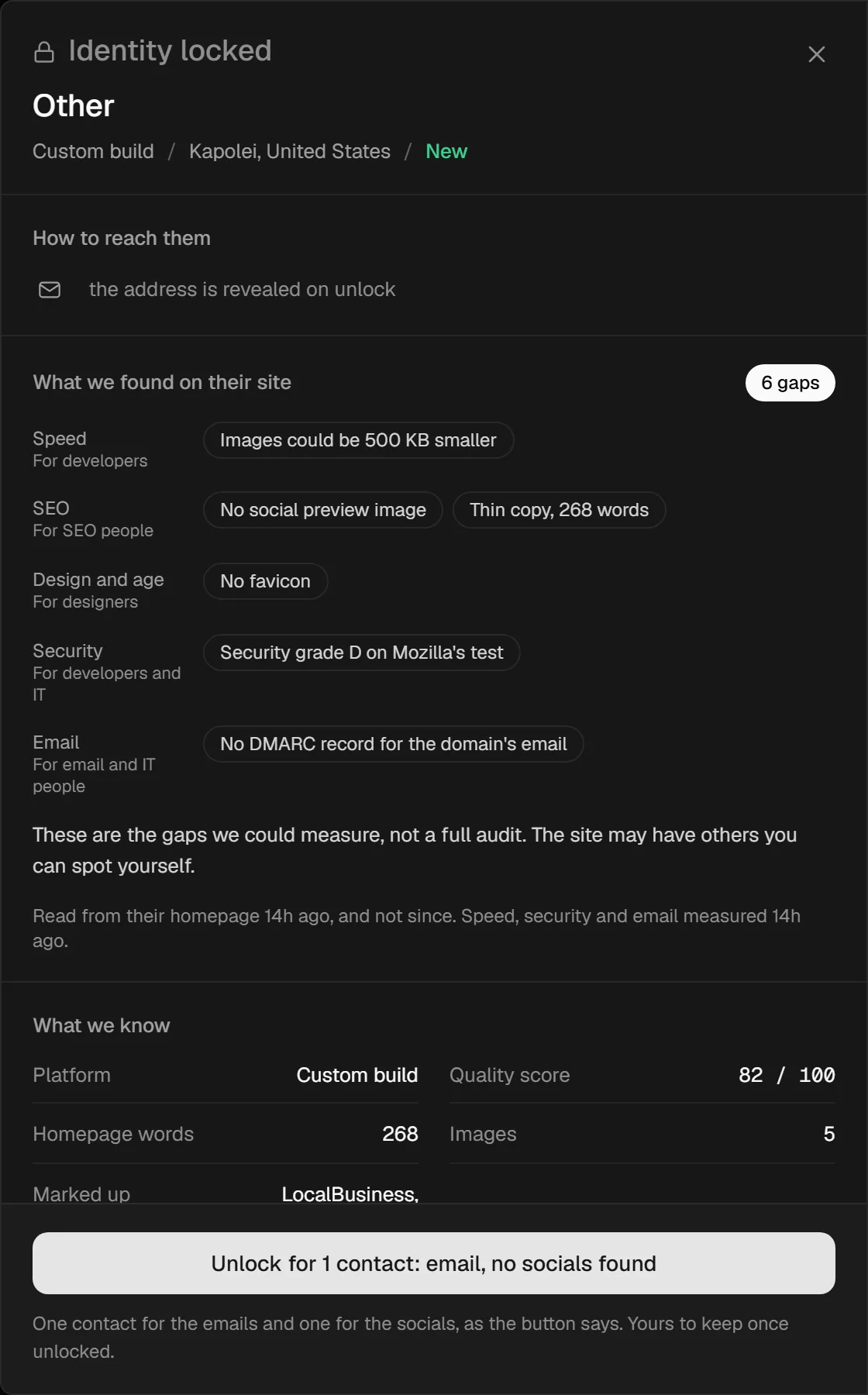
The first three go together naturally as one job: "how your business looks in Google and when someone shares your link". That is easy for an owner to picture, and easy for you to show.
If you want more ways to spot weak SEO from the outside, our guide to finding businesses with poor website SEO goes through the five-minute check in more detail.
How do you write the fix so the owner can see it working?
Do the first one for free, in the email. Read the homepage, then write the description you would set. For example, for a new bakery site:
Sourdough, pastries and celebration cakes baked fresh every morning in Hove. Order online by 6pm for next-day collection.
That is about 120 characters, and it names what they sell, where, and the one thing a customer needs to know. A good description:
- Says what the business sells and who for, in the first few words.
- Includes a place if the business serves one area.
- Gives one concrete reason to click: next-day collection, free returns, a booking slot this week.
- Matches the page. Google is more likely to use a description that accurately summarises the page it sits on.
- Stays around 150 to 160 characters or less, so the important part survives on desktop. Google cuts by width, not by a hard count, so front-load the words that matter.
Then tell them where it goes, so they know it is a small change and not a rebuild. On Shopify, the homepage title and description are under Online Store, then Preferences. On WordPress, an SEO plugin such as Yoast or Rank Math adds a description box to each page. Most site builders have an SEO section in the page settings.
The paid job is everything around it: a description for every key page, product or service page, structured data, a social preview image, and a check in a few weeks of how the snippets actually appear. Price it as a small fixed project. Owners in their first month say yes to small, clear jobs far more readily than to a monthly retainer from someone they have never heard of.
Who do you send it to, and will the email arrive?
A guessed address like info@ or hello@ might exist, might bounce, or might go to a shared inbox nobody reads. A bounce costs you more than one lost lead: if your emails bounce often, mailbox providers start treating your domain as a spammer, and your next emails land in junk.
A verified email is one checked with the business's own mail server before you send. The server is asked whether it would accept mail for that address, and only addresses it confirms are used. You can do a rough version by hand:
- Look for an address on the site itself, in the footer, the contact page, the privacy policy or the terms. An address the business published is the safest start.
- Check the domain has mail servers at all, with a free MX lookup. No MX records almost always means nobody is receiving email at that domain.
- Prefer a named person's address over a shared one when the site gives you one. The owner of a week-old business usually reads everything, but a named address makes that certain.
- If you must guess, send one email and watch for a bounce before sending anything else to that domain.
Here is a first email that leads with the description and keeps it short:
Subject: The line Google shows for Hove Sourdough
Hi Sam,
Congratulations on the new site. I searched for you in Google and the line under your link is currently your opening hours and "Your basket is empty", because the homepage has no description set.
Here is one you could paste in today, free:
"Sourdough, pastries and celebration cakes baked fresh every morning in Hove. Order online by 6pm for next-day collection."
In Shopify it goes under Online Store, then Preferences. Your product pages have the same gap, and links to the site shared in WhatsApp show no preview image. If you want, I can set all of that up this week as one small fixed job.
Either way, good luck with the launch.
Alex
The owner gets a usable line before you ask for anything, and they can confirm the problem with one Google search. The paid step at the end is small enough to say yes to by reply. If they do not answer, our guide on following up with a new business lead covers what to send next without being pushy.
Can you get a daily list of new sites with no description?
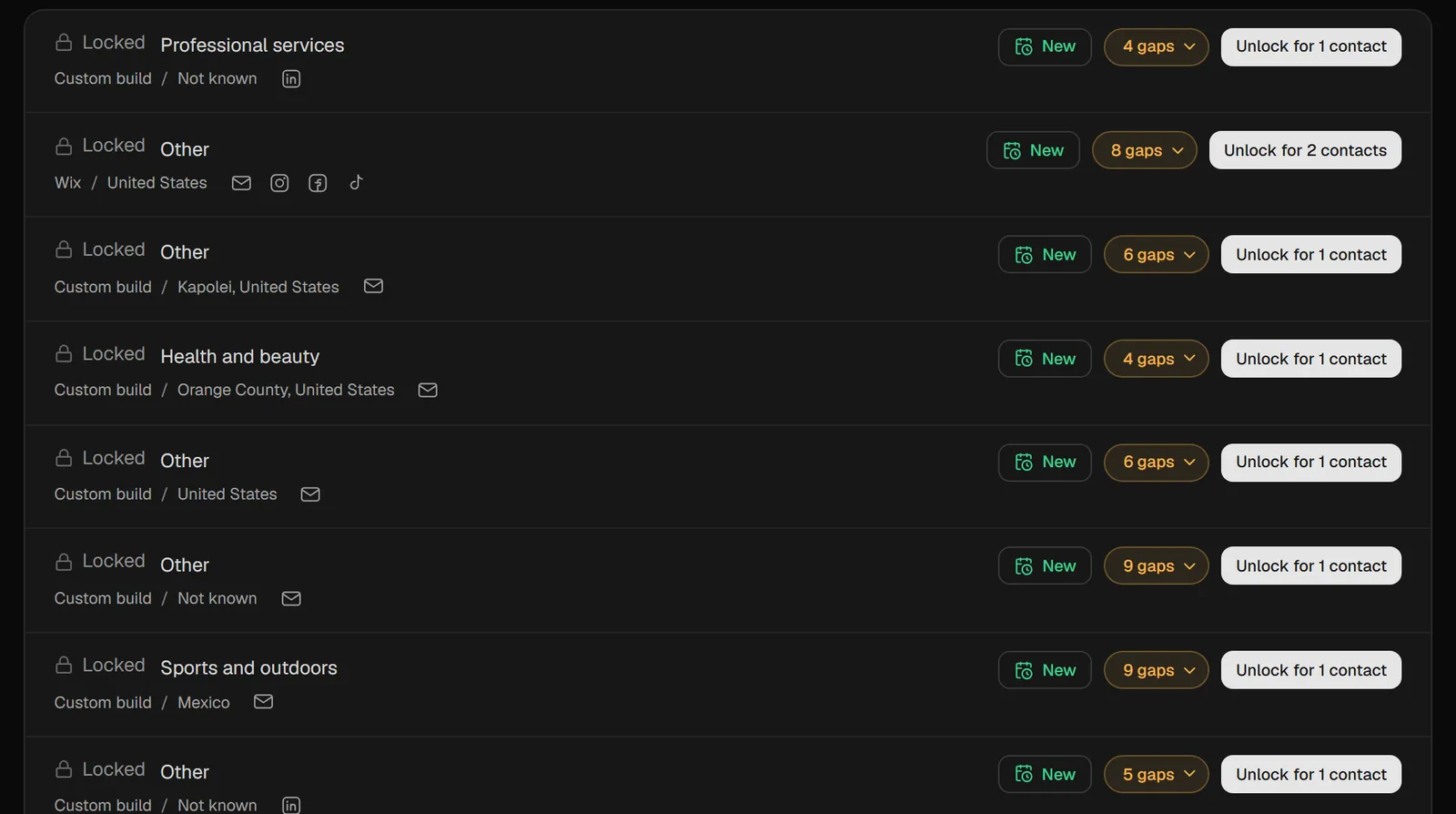
Doing all of this by hand works, but the slow part is not the meta check. It is wading through certificate logs, ruling out parked pages and test servers, confirming each site is a real business, and finding an email that will not bounce.
That is the part Vetted Leads does. It reads the certificate logs, visits each new site, checks it is a real business and not a parked or placeholder page, lists the homepage gaps it can measure (a missing meta description, no structured data, no social preview image, no favicon, images without alt text and the rest), and checks the email with the business's mail server. Each lead lands in a feed the day the site goes live, with its gaps listed, so you can see at a glance which new sites have no description. If you sell SEO in general, the page on finding SEO clients shows how that looks.
Open five new homepages today
Pick five sites that launched this week, from the logs, a launch post or a time-filtered Google search. View the source of each homepage and search for the description tag. For every one that is missing, write the line you would set and send it in a short email to a checked address, with one or two other gaps from the table above. It takes under an hour, and each email opens with something the owner can use straight away.
If you would rather start from a list that has already been checked, try Vetted Leads with 3 free contacts. No card needed, and the newest leads are there each day.
Questions people ask
Does a missing meta description hurt a website's rankings?
Not directly. Google has said for years that the meta description is not a ranking signal. What it changes is the snippet under the link in search results, which affects whether people click. That is why the honest pitch is about clicks and first impressions, not about rankings.
How long should a meta description be?
Google sets no fixed limit and cuts snippets by screen width, not by a character count. Many SEOs aim for roughly 150 to 160 characters so the main point survives on desktop, and put the most important words first so it still reads well on a phone.
Does Google always use the meta description I write?
No. Google may write its own snippet from the page text when it thinks that matches the search better. A clear, accurate description that summarises the page is used more often than a vague or stuffed one, and it is the most direct say the owner has over the snippet.
How do I check whether a website has a meta description?
Open the page, press Ctrl+U (Cmd+Option+U on a Mac) to view the source, and search for name="description". If there is no match, or the content is empty, the page has none. Lighthouse in Chrome DevTools also flags it under SEO as "Document does not have a meta description".
Is a missing meta description worth pitching on its own?
Usually not as a paid job, because the fix takes minutes. It works best as the proof in your first email: write the new description for them, then offer the larger job, such as descriptions for every key page, structured data and a social preview image.
Can I get a list of new websites without meta descriptions automatically?
Yes. Vetted Leads lists new business websites the day they go live, with their homepage gaps, including a missing meta description, and an email checked with the mail server. You can [try it with 3 free contacts, no card](/).