
MCP connector
Vetted Leads, inside your AI app
Connect once and ask in plain English. Your AI app searches new businesses for you, counts them, and unlocks the ones you want with your own contacts.
The connector's address
https://mcp.vettedleads.appPaste it into your AI app. You sign in to Vetted Leads and press Allow. No API key.
Set it up in your app
Pick your app. Every one of them connects by signing in.
In Claude on the web or the desktop app, open Settings, then Connectors (under Customize). Press Add, then Add custom connector.
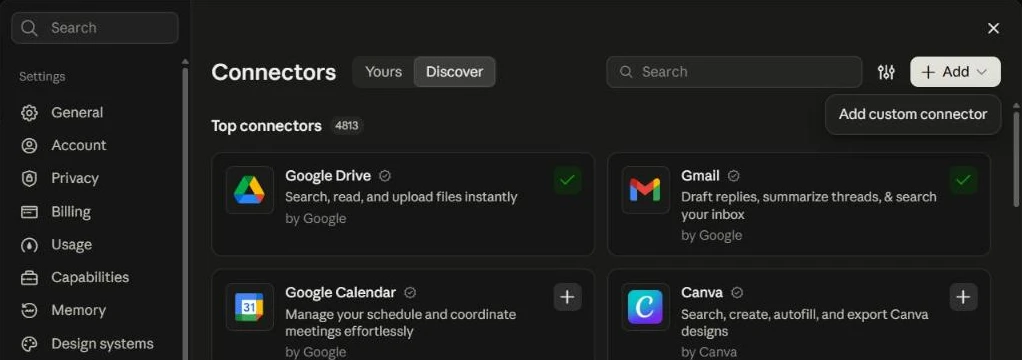
Name it Vetted Leads and paste this as the MCP server URL.
https://mcp.vettedleads.app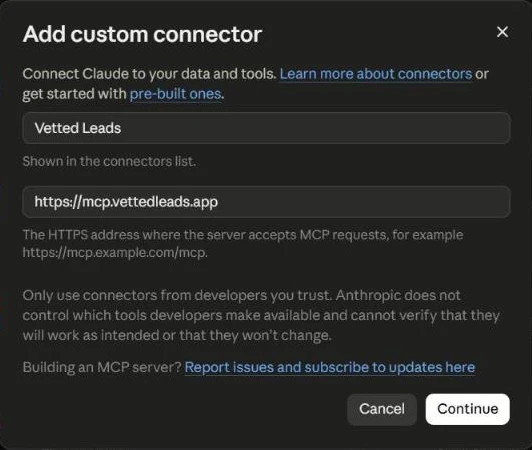
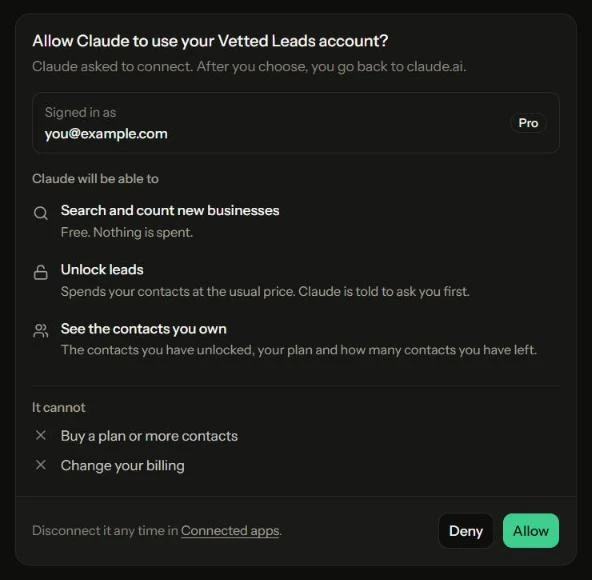
Press Continue. Sign in to Vetted Leads if asked, and press Allow.
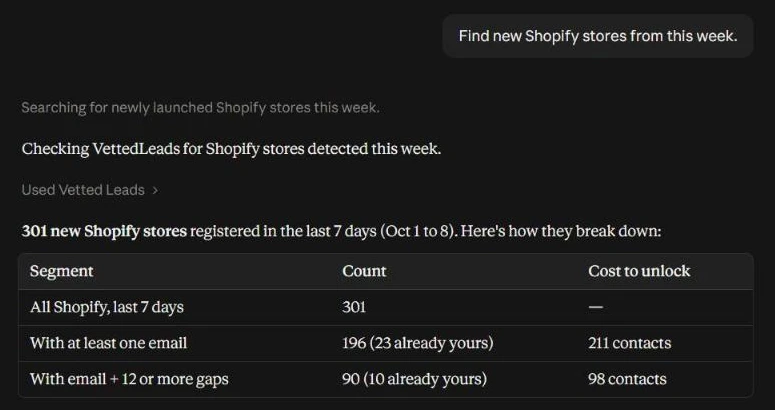
In a chat, check Vetted Leads is on (press +, then Connectors) and ask, for example: find new Shopify stores from this week.
If you connect from the Claude desktop app, your browser may first show "Finish connecting a connector?" That page is Claude's, not ours: if you just started connecting, press Continue connecting.
Add the server for every project:
claude mcp add --transport http --scope user vetted-leads https://mcp.vettedleads.appIn Claude Code, run /mcp, pick vetted-leads and sign in. Your browser opens on the Allow page.
In ChatGPT, open Settings, then Apps, then Advanced settings, and turn on Developer mode.
Press Create app. Name it Vetted Leads and paste this as the server URL, with OAuth as the sign in.
https://mcp.vettedleads.appPress Create, sign in to Vetted Leads and press Allow.
ChatGPT decides which of its plans can use Developer mode, and which can use actions that change something, such as unlocking. Searching works wherever the app does.
Add the server to Codex's config:
~/.codex/config.toml
[mcp_servers.vetted-leads] url = "https://mcp.vettedleads.app"Then sign in:
codex mcp login vetted-leads
Add this to Cursor's MCP file:
~/.cursor/mcp.json
{ "mcpServers": { "vetted-leads": { "url": "https://mcp.vettedleads.app" } } }Open Cursor Settings, then MCP, and press Login next to vetted-leads.
Add this to Windsurf's MCP file. Windsurf calls the address serverUrl, not url.
~/.codeium/windsurf/mcp_config.json
{ "mcpServers": { "vetted-leads": { "serverUrl": "https://mcp.vettedleads.app" } } }Open the MCP panel in Cascade and press Login next to vetted-leads.
Add this to your workspace's MCP file:
.vscode/mcp.json
{ "servers": { "vetted-leads": { "type": "http", "url": "https://mcp.vettedleads.app" } } }VS Code asks you to trust the server, then to sign in. Signing in needs VS Code 1.101 or newer.
Add this to Zed's settings:
~/.config/zed/settings.json
{ "context_servers": { "vetted-leads": { "url": "https://mcp.vettedleads.app" } } }Zed asks you to sign in. Sign in to Vetted Leads and press Allow.
Then just ask
Your app picks the tool. These are real questions and the tool each one lands on.
“Find new Shopify stores from this week.”
search_leadsfree, no names or emails“How many roofers registered a website in the last 7 days, and what would unlocking them cost?”
count_leadsfree, priced before you spend“Find sites with no analytics, most gaps first.”
search_leadsfilter by the gap you fix“Unlock the 20 newest restaurants that have an email.”
unlock_leadsyour app asks first, then spends your contacts“Show me the contacts I unlocked today.”
my_contactseverything you own“How many contacts do I have left?”
accountand when your plan ends
Five tools
search_leads- Search new businesses by country, trade, platform, age and gaps. Free, 50 a page, no names or emails.
count_leads- Count a search and price unlocking it, leaving out what you already own. Free.
unlock_leads- Reveal names, websites, emails and socials, at the feed's price. Your app is told to ask you first, and it never spends more than the total it names.
my_contacts- Every contact you own, newest first, with a link to download them as a spreadsheet.
account- Your plan and how many contacts you have left.
Questions
What is MCP?
Model Context Protocol, the standard way AI apps use other services. Connect Vetted Leads once and your app can search and unlock leads for you while you chat.
Which apps work?
Any app that connects to a remote MCP server by signing in: Claude, Claude Code, ChatGPT, Codex, Cursor, Windsurf, VS Code, Zed and more. Apps that only take an API key, such as Cline, cannot connect yet.
Who can use it?
Everyone on Starter or Pro. A free account can connect, and the app will tell it that searching and unlocking need a plan.
What does it cost?
Nothing on top of your plan. Searching and counting are free. Unlocking spends your contacts at the same price as the feed. Your app is told to ask you before it spends any, and it can never spend more than the total it names.
Is there a limit?
No limit on searching. Unlocking stops only when your contacts run out, up to 1,000 leads at a time. The one guard is about two requests a second per account, which only a stuck app ever reaches.
Can the app see my password or pay for things?
No. You sign in with Google, so there is no password to see. The app cannot buy a plan or contacts, or change your billing: our database refuses its key anywhere but the connector. It does act for you, so only allow apps you trust.
How do I disconnect an app?
Account, then Connected apps, then Revoke. It stops at its next request.