
The fastest way to find new ecommerce websites is the public certificate logs, where a store's domain appears as soon as it gets an HTTPS certificate, often before it has made a single sale. Platform footprints in Google, launch posts and new domain lists fill in the gaps, and every store you find needs a few minutes of checking before you pitch it.
If you build stores, run ads, write product copy or fix SEO, timing matters as much as the find. A store that opened this month has spent its budget on stock and a theme. It hasn't hired anyone for the work around the store yet, and the owner still reads every email that arrives.
Why do new online stores need outside help so soon?
Launching a store is the easy part. Shopify, WooCommerce, Wix and Squarespace let one person go live over a weekend. What they don't do is fill in everything around the products: the snippet Google shows, the image that appears when someone shares a link, the descriptions behind product photos, the speed on a phone over mobile data.
So the first few weeks tend to go the same way. The owner posts the link, gets a trickle of visits from friends, and waits for strangers who don't come. That's when they start asking why, and it's when a small, specific offer from you lands best.
Who needs what, roughly:
| You sell | What a new store usually needs | When it starts to hurt |
|---|---|---|
| Store design and development | Theme fixes, mobile speed, product page layout | First week, when visits don't turn into carts |
| SEO | Titles, meta descriptions, product structured data | First month, as Google starts indexing pages |
| Paid ads and social | A clean link preview, pages that load fast | The day they boost their first post |
| Copy and content | Product descriptions, an about page, image alt text | Before the first ads run |
A store that has been open three years has settled habits and usually someone who handles this. A store that opened last Tuesday has neither.
Which sources turn up online stores in their first days?
There is no public register of new online stores. You build your own list from several places, and each one catches stores at a different stage.
Certificate logs: stores within hours of getting HTTPS
Every site served over HTTPS needs a certificate, and the certificate authorities browsers trust publish every certificate they issue to public logs. The system is called Certificate Transparency. When a new store's domain is connected to Shopify, Wix, Squarespace or a WordPress host, a certificate is usually issued within minutes, and the domain shows up in the logs.
You can search the logs for free on crt.sh. Search with a wildcard around a niche word, such as %candle% or %skincare%, and look at the date each certificate was logged. The newest rows are certificates issued in the last day or two. Many of them are renewals for sites that have been up for years, so check whether a domain has earlier certificates before you treat it as new.
The limits: the logs list every domain, not just stores, so most rows are internal servers, test sites and parked names. Broad wildcard searches on crt.sh also time out often. You'll open a lot of tabs to find a few stores.
Store platform footprints in Google
Store platforms leave patterns you can search for. Every Shopify store has a myshopify.com address, even when it also uses its own domain, so a search like site:myshopify.com candles brings up Shopify stores selling candles. Once a store connects its own domain, Google usually indexes that instead, so this search mostly finds stores still on their myshopify.com address, which are often the newest ones. Adding Google's after: operator, for example after:2026-11-01, narrows results to pages Google dated recently, though that date isn't always the launch date.
The limit: Google can take weeks to index a new store. This catches stores in their first month or two, not their first day.
Product Hunt and BetaList
Founders post launches on Product Hunt and BetaList. Both are free to browse, with launches listed by day.
The limit: both lean heavily toward software. You'll find the odd consumer brand, but most stores selling physical products never post there.
Launch posts on social media
Small store owners announce their launch on Instagram, TikTok, Facebook groups and Reddit. Searching phrases like "our store is live", "we just launched" or "grand opening" with your niche turns up owners in their first week, often describing in their own words what isn't working.
The limit: it's slow, the results are mixed with resellers and dropshipping course ads, and you still have to find an email.
New domain lists, before the store is built
Several services publish daily lists of the domains registered the day before, some free with a delay. A store's domain often appears here before the site is even built.
The limit: most new domains never become a website, and most of the ones that do aren't stores. You'll check many empty pages for each store you find.
| Source | Cost | How new | Main limit |
|---|---|---|---|
| Certificate logs (crt.sh) | Free | Hours to days | Every domain, not only stores |
site:myshopify.com searches | Free | Weeks | Shopify only, slow indexing |
| Product Hunt, BetaList | Free | Launch day | Mostly software |
| Social launch posts | Free | Days | Slow and noisy |
| New domain lists | Free or paid | Before the site exists | Most never become stores |
How do you tell which platform a new store runs on?
The platform changes your pitch. A Shopify owner wants theme and app advice; a WooCommerce owner may need help with hosting or plugins. You can tell in a minute: open the page source (right click, then View page source) and search for these:
| Look for in the source | Platform |
|---|---|
cdn.shopify.com | Shopify |
wp-content/plugins/woocommerce | WooCommerce on WordPress |
static.wixstatic.com | Wix |
static1.squarespace.com | Squarespace |
cdn11.bigcommerce.com | BigCommerce |
If none of these appear, it may be a custom build or a smaller platform. Write that down: a custom store is usually a bigger job.
How can you prove a store opened recently and is real?
A store that looks new isn't always new. Owners move old shops to new domains, and agencies relaunch old brands. Before you write "congratulations on the launch", check four things.
- The domain's age. Look the domain up with a free registry lookup (RDAP or WHOIS; ICANN runs one, and country domains such as .uk use that country's registry). The creation date tells you when the name was registered. An old domain with a fresh-looking site is usually a redesign, not a launch (or an expired name someone new bought).
- The first certificate. On crt.sh, the earliest certificate for the exact domain shows roughly when it first served HTTPS. If the earliest one is from last week, the site is new.
- That it loads and sells. Open it on your phone. You want real products with prices, a cart and a returns or shipping page. A theme demo still showing "Product title" placeholders isn't ready for you yet.
- That it's a business. Skip parked pages, coming soon pages with no products, and copies of a dropshipping template with no brand behind them. Look for an owner's name, an about page or a social account that actually posts.
Stores give you two more clues that ordinary websites don't. On most Shopify stores, adding /products.json to the address shows each product's created_at date; if every product was created in the last couple of weeks, the store is new. And a Shopify store showing an Opening soon password page is about to launch: bookmark it and come back in a week.
If the domain is under a month old, the first certificate is recent and the store has real products, you've found a new ecommerce website worth pitching.
Which gaps on a young store cost it sales?
These are gaps you can see from the homepage alone, without logging in or guessing. Each one is easy to explain to an owner who isn't technical.
| Gap | How to spot it | What it costs the store |
|---|---|---|
| No meta description | No description meta tag in the source | Google writes its own snippet, often from menu or cookie text, which can mean fewer clicks |
| No structured data | No application/ld+json on the homepage or on one product page (most Shopify themes include it on product pages; it goes missing more on WooCommerce and custom builds) | Products can miss the richer results with price and stock that Google shows for product pages |
| No social preview image | No og:image tag | Links shared on Facebook or WhatsApp show a blank or random image, just when launch traffic comes from shares |
| No favicon | Blank icon in the browser tab | Looks unfinished in tabs, bookmarks and some search results |
| Images with no alt text | img tags without alt | Screen reader users hear nothing useful, and image search has less to go on |
| Old copyright year | The footer shows a past year | A brand new store looks abandoned; common when a theme ships with a fixed year |
| Pages over plain http | The address bar says Not secure (rare on Shopify, Wix or Squarespace, which force HTTPS; look for it on self-hosted stores) | Browsers flag the page to shoppers before they buy |
| Slow on mobile | Run the homepage through Google's PageSpeed Insights | Most store visits come from phones, and shoppers leave slow pages |
Pick the one gap that fits what you sell. An SEO person leads with the meta description or structured data. An ads person leads with the social preview image or mobile speed. Don't send the whole table: one gap and its fix is a pitch, eight gaps is an audit nobody asked for.
How do you reach the founder and not a dead inbox?
New stores often show no email at all, only the platform's contact form. When you do find an address, it's often a guess: info@, hello@ or sales@, set up once and never read, or never set up.
A guessed address and a verified one aren't the same. A guessed address is one you assume exists because the pattern is common. A verified address has been checked with the store's own mail server, which confirmed the mailbox exists. Guessed addresses bounce, and enough bounces push your own mail into spam folders, so even your good emails stop arriving.
To check an address by hand:
- Look up the domain's MX records with any free DNS lookup. No MX records usually means the domain isn't set up to receive mail.
- Run the address through a free email checker that asks the mail server whether the mailbox exists, without sending anything.
- Treat an accept-all or unknown answer as unverified. Some servers say yes to every address, so that check proves nothing.
- If you still have no address, message the store's Instagram or Facebook page. In the first weeks the owner usually answers personally.
Then keep the message short and specific. A made-up example:
Subject: Your candle store's link preview
Hi Maya, I saw Larkfield Candle Co. went live this month. When someone shares your homepage on WhatsApp or Facebook, no preview image shows, just a grey box. A lot of launch traffic comes from shares, so that's the first thing I'd fix. I can add the image and set the same up for your product pages, flat fee, done this week. Want me to send a screenshot of how it looks now?
It names one gap, says what it costs them in plain words, offers a small fixed job and asks one easy question. Nothing in it needs a call to understand.
Can you get these stores without checking each one by hand?
Doing all of this by hand works, but it's slow, because most of what turns up in the certificate logs isn't a store or even a business. On 19 November 2026 we checked 338,692 sites. As of the morning of 20 November, 1,130 new businesses had reached our feed in the previous 24 hours. Most of what we check is dropped as not a business, not live, not new, or with no email we could confirm.
That filtering is what Vetted Leads does. It reads the certificate logs, checks each new site is a real business and not a parked page, lists the gaps on its homepage, and checks the email with the business's own mail server before the lead reaches the feed.
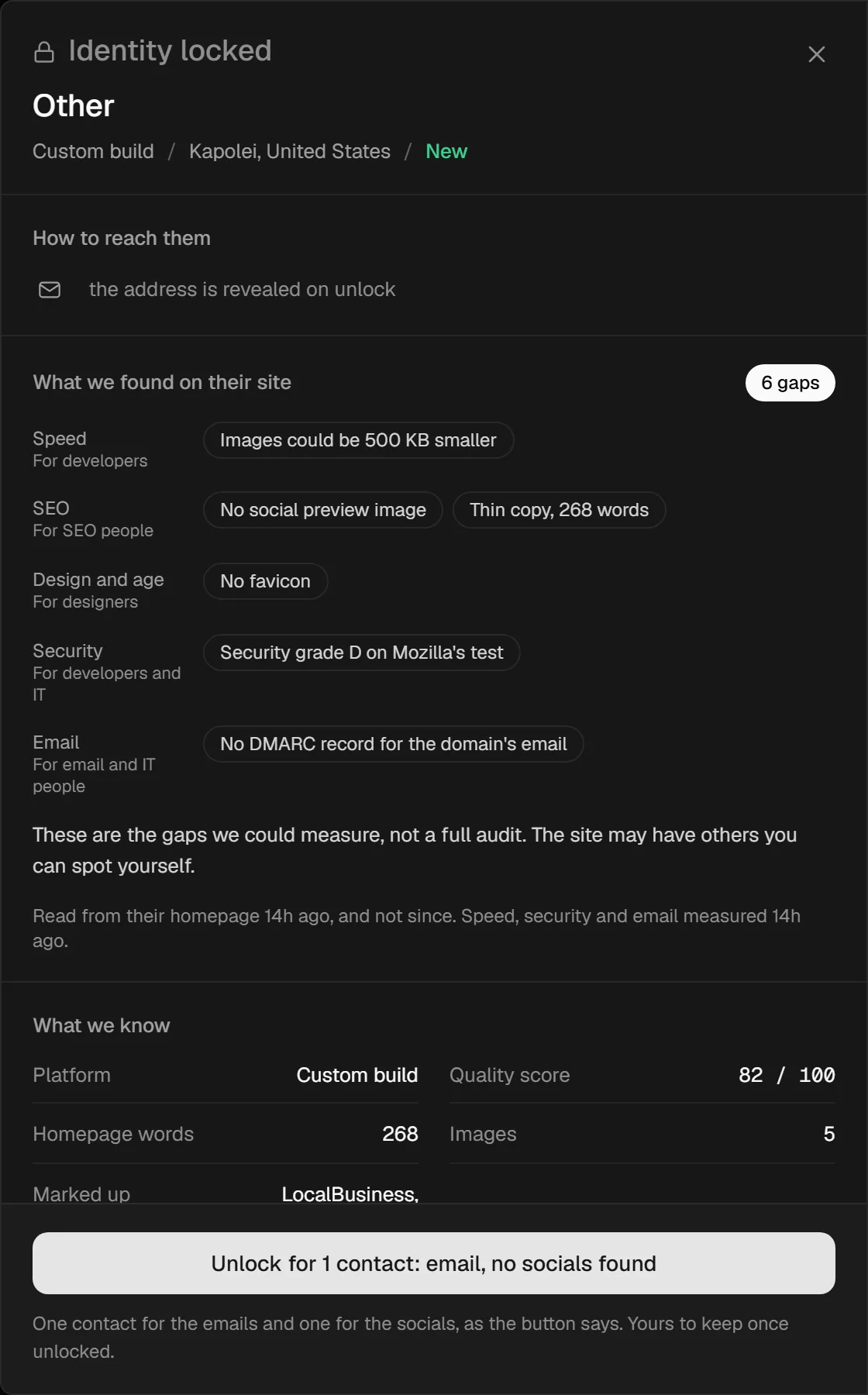
New stores appear on the day their site goes live. You can start free with 3 contacts to try and the newest 50 leads each day, no card; plans are on the pricing page.
If Shopify is your main market, the Shopify clients page shows what those leads look like, and the guide on how to find new Shopify stores goes deeper on that one platform.
Pick ten stores before lunch
Today, search crt.sh for one niche word, open the fifty newest domains, keep the ones that are real stores under a month old, and write down one gap for each store that passes. Email the first ten, each about a single gap. If you get fewer than ten, run a second niche word. Ten emails is enough to see which pitch gets replies.
If you'd rather start with the checking already done, try Vetted Leads with 3 free contacts to try, no card.
Questions people ask
How can I find newly launched ecommerce websites for free?
Search the Certificate Transparency logs on crt.sh for a niche word and look at the newest certificates, search Google with site:myshopify.com plus a product type, and look for launch posts on Instagram, TikTok and Reddit. Each source is free but needs manual checking, because most results are not live stores.
How do I know which platform an online store uses?
Open the page source and search it. cdn.shopify.com usually means Shopify, wp-content/plugins/woocommerce means WooCommerce, static.wixstatic.com means Wix, static1.squarespace.com means Squarespace and cdn11.bigcommerce.com means BigCommerce.
How can I tell when an online store was launched?
Check two dates. The domain's creation date from a registry lookup (RDAP or WHOIS) tells you when the name was registered, and the earliest certificate for the domain on crt.sh tells you roughly when it first served HTTPS. An old domain with a fresh site is usually a redesign, not a launch.
What should I pitch a new ecommerce store first?
One small, visible fix that matches what you sell: a missing social preview image for an ads person, a missing meta description or product structured data for an SEO person, slow mobile loading for a developer. Offer it at a flat fee and ask one question. A full audit is too much for a first message.
Is there a tool that lists new online stores every day?
Vetted Leads shows new businesses, stores included, the day their website goes live, with each site's gaps and an email checked with its mail server. You can [try it free](/) with 3 contacts to try, no card.