
To find web design clients without cold calling random businesses, skip the bought lists and work from signals: a business whose website went live this week, or a homepage with a problem you can name in one sentence. Then you email the owner about that one problem, so your first message already has a reason to exist.
Relevance is most of a web design pitch. A plumber who has had the same site since 2017 and gets enough calls has no reason to listen to you. A bakery that switched its site on three days ago, with no favicon and a hero image that crawls on a phone, has a reason, and it has not hired anyone to fix it yet.
Why does dialling down a list rarely land a web design project?
A random list is built for volume. Somebody scraped a directory, sorted it by town and category, and sold it. Nothing on it tells you whether the business wants a website, has the money for one, or already pays a designer. So every call or email starts from zero: you have to find the problem while the owner is deciding whether to hang up.
Targeted prospecting turns that order around. You find the problem first, then decide whether to write at all.
| Random list | Targeted by signal | |
|---|---|---|
| Why you are contacting them | They were on the list | Their site just launched, or it has a gap you can see |
| First line of your message | About you | About their homepage |
| Whether they already have a designer | Rarely checked | Checked in the footer credit before you write |
| Work before you send | None, so replies are rare | Five to ten minutes per business |
| What a reply usually is | "Not interested" | A question about the thing you pointed out |
The second column costs more time per business. It also means you send ten emails a day instead of making a hundred calls, and each of the ten has something to say.
Who needs a web designer, and when?
Most of the work a solo designer or small studio can win comes from three moments:
- In the first weeks online, the owner has just paid for a domain and probably built the site on a template, or had a friend do it. They are watching it closely and have not settled on anyone to look after it.
- After a change in the business (a new product line, a move into selling online, a rebrand, a second location), the site stops matching what the business does.
- When a site decays in plain sight, with a copyright year from four years ago, pages served over plain http, or a layout that breaks on a phone. The owner may not have noticed. Their customers have.
The first moment is the easiest to find and the least crowded, because few people go looking for businesses that are a week old. The rest of this guide focuses on it, with notes on the other two where they fit.
Which free sources show a new website before Google does?
There is no single list of new websites, but several public sources show them early. Each one costs you some time and each has a blind spot.
The certificate logs
Every site that serves pages over https needs a TLS certificate, and certificate authorities publish the certificates they issue to public logs, a system called Certificate Transparency. When a new domain gets its first certificate it appears in those logs, usually well before Google has indexed the site.
You can search the logs for free on crt.sh, by domain or by a word in the domain such as a town name or a trade ("bakery", "plumbing"). What it takes is patience and a filter in your head. What it misses: most entries are not businesses. You will see mail servers, staging subdomains, personal projects and domains that will never host a page. Expect to open a lot of names to find one worth writing to.
Product Hunt and BetaList
Product Hunt lists new products on their launch day, and BetaList lists early-stage startups, each with a link to the maker's site. They lean heavily toward software and apps, and many of those teams already have a designer. They are still worth a look if you design landing pages for startups, because a team that launches with a rough page often wants a better one before its next push.
Launch posts on social media
Owners announce their sites. Search LinkedIn, Instagram and X for phrases such as "our website is live", "new website is up" or "we just launched", and sort by the newest posts. You get the owner's name and how they talk for free, which helps the first message. The limit is reach: you only see owners who post, and the search tools on these platforms change often.
Google, filtered to the past week
Search for a trade plus a town plus words new sites tend to use, such as "now open" or "grand opening", then use Google's Tools menu to limit results to the past week. This finds pages Google has just indexed. That is later than the certificate logs, but the results are already sites that are live and have text on them.
Company registers
Many countries publish new company registrations. The UK's Companies House, for example, has a free search. A registration tells you a business exists, not that it has a website, so this source suits the "you have no site yet" pitch better than the "fix what you launched" one.
| Source | Cost | How early | Main limit |
|---|---|---|---|
| Certificate logs (crt.sh) | Free | Soon after the first certificate | Mostly noise, needs filtering |
| Product Hunt, BetaList | Free | Launch day | Mostly software teams |
| Social launch posts | Free | Launch day | Only owners who post |
| Google, past week | Free | Days to weeks | Other people searching find the same sites |
| Company registers | Free in many countries | Before the site exists | No site to critique yet |
How can you tell a site opened this week and not in 2019?
A new certificate does not mean a new business. Sites renew certificates every few months, and old domains change hands. Before you write, run four quick checks.
- Domain age at the registry. Look the domain up on ICANN's lookup tool (lookup.icann.org) and read the creation date. Some country domains publish this through their own registry instead.
- First certificate date. In crt.sh, sort the domain's certificates by date. If the first one is from last week, the site is at least new to https.
- Earliest archive capture. The Wayback Machine (web.archive.org) shows the first time a page was saved. No captures at all fits a young site, though some small sites are never archived.
- A real business on the page. Look for products or services with prices, a location or service area, an about page, a way to buy or book. A parked page, a hosting company's default screen, or "coming soon" with nothing else is not a lead yet. Note it and check back in a fortnight.
If the domain is ten years old but the site looks freshly rebuilt, you have found the second moment, a change, and the pitch is different. They just spent money on a site, so lead with something small that makes it work harder, not a redesign.
What will you see wrong on a homepage built in a weekend?
New sites, especially ones put together from a template over a weekend, tend to skip the same things. All of these are visible from the homepage alone, so you can check them before you write.
| Gap | How to check | What it costs the business |
|---|---|---|
| No meta description | View the page source and search for name="description" | Google writes its own snippet from text on the page, sometimes menu or footer text, so the search result can read badly |
| No structured data | Run the page through Google's Rich Results Test | Search engines get less help understanding the business, its hours or its products |
| No social preview image | Send the link to yourself in a chat app | Every share shows a blank or random box instead of the brand |
| No favicon | Look at the browser tab | The tab and bookmarks show a generic icon, which looks unfinished next to other tabs |
| Images with no alt text | View source and look at the img tags | Screen reader users hear nothing useful, and image search has nothing to go on |
| Old copyright year | Scroll to the footer | Visitors read the site as abandoned, even when it is not |
| Pages loading over plain http | Look for the padlock, and try the http address | Browsers warn visitors that the page is not secure |
| Slow on mobile | Run PageSpeed Insights and read the mobile tab | Visitors on phones leave before the page finishes drawing |
Google's own guide to controlling your snippets in search results explains how the meta description is used, and it is a handy page to send an owner who asks why you raised it.
For a web designer, the social preview image, the favicon and mobile speed usually make the strongest openers. The owner can see each one in under a minute, and they read as design problems rather than code. Keep the rest of the list for the call.
What should the first line of your email say?
Pick the single gap that is easiest for the owner to see, show it, and offer to fix it as a small fixed-price job. A sample:
Subject: the preview when someone shares your site
Hi Sara,
Congratulations on getting the Fern & Flour site live this week. I sent the homepage link to myself to see how it looks in a chat, and it comes up as a grey box with no image, so anyone you share it with sees nothing of the brand.
It is a short fix: one image sized for link previews, plus the tags that tell Facebook, LinkedIn and messaging apps to use it. I could do it this week for a fixed fee and send you a before and after so you can check it on your own phone.
Would that be useful?
Tom
It names the business, proves you looked, and describes one problem the owner can check for themselves, then asks a question they can answer with yes or no. Leave portfolio links, your list of services and a booking link out of the first message. They come after a reply. Our guide on how to pitch a business that just launched covers what to say once you get one.
Where do you send it so the owner actually reads it?
A new business often has no email on its homepage at all, or only a form. The usual move is to guess: info@, hello@, or firstname@ the domain. Guesses fail more often than people expect, and on a brand new domain the mailbox may not exist yet.
| Guessed address | Verified address | |
|---|---|---|
| Where it comes from | A pattern like hello@ or firstname@ | Found on the site or in public records, then checked |
| Checked with the mail server? | No | Yes, the business's mail server says the mailbox exists |
| When it is wrong | It bounces, which counts against your sending domain | Rare, because the check happens before you send |
| Who reads it | Possibly nobody | The address the business actually set up |
A bounce costs more than one lost email. Mail providers watch how often your messages bounce, and a run of them pushes your later emails toward spam, including the ones that go to real people.
To check an address by hand:
- Look up the domain's MX records with any free DNS lookup tool. No MX record usually means the domain is not set up to receive mail.
- Use an email checker that asks that mail server whether the mailbox exists, without sending anything.
- Treat a "catch-all" result with care. Some servers accept every address, so the check cannot tell a real inbox from a made-up one.
- If the site has a contact form and no address, use the form. It beats a guess.
Is there a way to skip the searching and checking?
Everything above works, and it is slow. Searching the logs, checking the age, opening the homepage, listing the gaps and checking an email can take five to ten minutes per business, and most of the names you open turn out not to be businesses at all.
That is the part Vetted Leads does for you. It reads the certificate logs as new sites appear, checks that each one is a real business or personal brand, not a parked page or a test site, lists homepage gaps like the ones in the table above, and checks the email with the business's own mail server before the lead reaches the feed. Each site lands in the feed the day it goes live.
The filtering is most of the work. On 24 November 2026 we checked 584,099 sites, and in the 24 hours to 25 November, 1,191 new businesses reached the feed. Most of what shows up in the logs is not a new business you could pitch, which is why doing this by hand eats a morning.
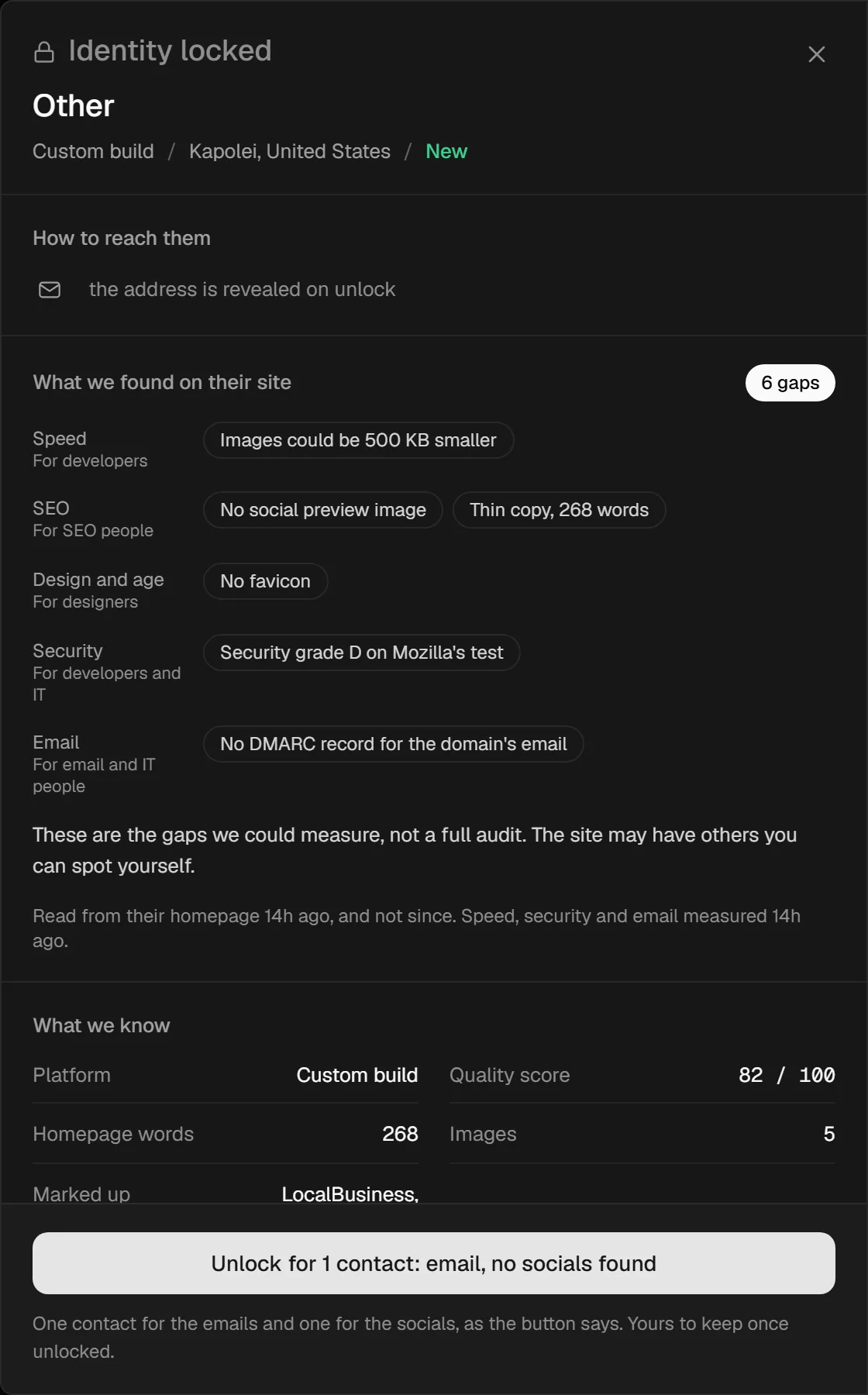
You can start on the free plan and look at the newest leads before you decide anything.
Your next five emails
Today, pick one source from the list above and one trade you like designing for. Find five businesses that went live in the past week, run the four checks, choose the one gap each owner can see fastest, and write five short emails like the sample. Send them from your own address, one at a time, and keep a note of who you wrote to and when, so you can follow up in a few days.
If you would rather skip the searching and start from businesses that are already checked, try Vetted Leads free: you get 3 free contacts, no card needed.
Questions people ask
What is the fastest way to find web design clients?
Start from businesses that have a visible reason to need you right now, such as a website that went live this week or a homepage with a problem you can point to. Five well chosen businesses with one specific problem each will usually get more replies than a hundred calls from a list.
Is cold email better than cold calling for web designers?
For most web designers, yes. An email lets you show the problem (a link, a screenshot, a before and after) and lets the owner check it in their own time. A call asks them to picture a website problem while they are busy with something else.
How can I tell if a business already has a web designer?
Look at the footer for a credit such as "Site by" or "Designed by", and check the page source for a theme or builder name. A credit does not rule them out: a business that paid for a site often still needs small fixes, and the original designer may not be available.
How many businesses should I contact each day?
Five to ten well researched emails a day is a pace one person can keep up. It leaves time to check each business properly and to reply quickly when someone answers, which matters more than volume.
Do I need a portfolio before I contact businesses?
It helps, but your first message should not depend on it. Leading with one specific fix for their own site, done for a fixed fee, shows your skill on the thing they care about. Share a portfolio once they reply.
Can I find web design clients for free?
Yes. The certificate logs, Product Hunt, BetaList, launch posts on social media and Google's past-week filter are all free. If you want new businesses already checked, with their gaps listed and a verified email, [Vetted Leads](/) gives you 3 free contacts to try, no card needed.