
Businesses that need a website redesign show themselves on the page: a copyright year from years ago, a site that crawls on a phone, a browser warning that says "Not secure", a Google result whose description is a menu or a cookie notice. You find them by searching for those signs, checking the business still trades, and writing to the owner about the one problem you saw.
For a web designer this is about the easiest prospecting to defend. You are not guessing that someone might want a website. You can point at the thing that is costing them, and that makes the first email easy to write and easy to answer.
Who actually pays for a website redesign, and when?
Not every business with an ugly site will pay to fix it. The ones that do usually fall into two groups.
The established business with a tired site. A dental practice, a roofing company or a law office that had a site built years ago and has not touched it since. The business is doing fine, which is exactly why the site got ignored. They have money and customers, and the site is quietly sending some of those customers to a competitor whose page looks like it was made this decade. The trigger for them is usually something that makes the gap visible: a new competitor in town, a bad month, a new partner who is embarrassed by the site, or a Google listing that suddenly shows fewer calls.
The new business that launched in a rush. Someone opens a shop or a studio, builds a site over a weekend on a template, and goes live because they need something up. A week later they know it is rough, but they had no time and no budget to do it properly. They do not need convincing that the site could be better. They need someone to show up with a clear, affordable way to fix it before customers form an opinion.
The second group is easier to reach early, because nobody else has pitched them yet. The first group pays more, but often needs a reason to act now. Knowing which one you are writing to changes the pitch, which we will get to.
Where can you spot sites that are overdue for a rebuild?
There is no single directory of "businesses needing web design". You build the list from a few free sources, each with its own trade-offs.
Search Google for the signs of a stale site
Search for your niche and a town, then scan the results with a designer's eye. A search like roofing contractor Leeds or family dentist Austin gives you the businesses that already rank. Open the ones on pages two and three: they are often there because the site is weak.
You can also search for the giveaway text directly, such as "copyright 2018" plumber Manchester. Google treats this loosely, so expect noise, but it surfaces sites nobody has edited in years.
Limits: slow, one site at a time, and the results lean toward businesses that already rank, which are not always the ones in trouble.
Google Maps and local directories
On Google Maps, search a category in a town and open the listings that have a website link. Listings with lots of recent reviews but a weak site are the best find on this list: the business is clearly busy, and the site is clearly behind it. Local directories and chamber of commerce member lists work the same way.
Limits: you are checking every listing by hand, and the businesses there are mostly established, so you are pitching the harder-to-move first group.
Run a shortlist through PageSpeed Insights
Once you have ten or twenty candidates, paste each homepage into PageSpeed Insights, Google's free speed test. It shows how the page performs on a phone and lists what slows it down. A poor mobile score on a site you already thought looked dated gives you a second, measurable reason to write.
Limits: it tests one page at a time and the scores move between runs, so quote what you saw rather than a precise number you cannot defend later.
Use the Wayback Machine to see when it last changed
The Internet Archive's Wayback Machine keeps snapshots of a great many public websites, though not every one. Look up a homepage and compare a snapshot from a few years ago with today. If they are the same page, the site has not been touched in that time, which tells you the owner is not paying anyone to look after it.
Limits: it confirms neglect but does not find new prospects on its own, and small sites are sometimes not archived at all. You use it to check a site you already have.
Watch the certificate logs for sites that launched in a rush
Every site that turns on HTTPS gets a certificate, and publicly trusted certificates are written to public Certificate Transparency logs. That means a brand new website usually shows up in those logs around the day it goes live, before Google has indexed it. Free search tools such as crt.sh let you look up the certificates issued for a domain, and with some technical effort you can follow the logs as new names appear.
This is where you find the second group: new businesses that launched a quick site and have not hired anyone yet.
Limits: the raw logs are huge and mostly noise (test servers, internal tools, parked domains), so you need a way to filter for real businesses.
Technology lookup tools
Tools like BuiltWith and Wappalyzer tell you what a site is built on, such as an old version of a page builder or a theme you know well. Useful if you specialise in one platform and want sites built on it.
Limits: they tell you what a site runs, not whether its owner needs or can afford a redesign.
| Source | Cost | Best for | Main limit |
|---|---|---|---|
| Google search | Free | Established businesses in a niche and town | Slow, one site at a time |
| Google Maps and directories | Free | Busy businesses with weak sites | Manual, mostly older businesses |
| PageSpeed Insights | Free | Checking a shortlist on mobile | One page per test |
| Wayback Machine | Free | Confirming a site has been left alone | Does not find new prospects |
| Certificate logs | Free, but technical | Sites in their first days online | Mostly noise without filtering |
| Technology lookup tools | Free tiers, paid for lists | Finding sites on a platform you know | Says nothing about need or budget |
Is the business still trading, or is the site a leftover?
A dated site can mean the business is too busy to care, or that it closed two years ago and nobody turned the site off. Five minutes of checks saves you writing to a dead business.
- Look for recent activity: Google reviews from the last few months, a social media post this year, a news item. Any one of these tells you someone is still there.
- Try the phone number or booking link. If the number on the site is disconnected, stop.
- Check the domain's age. Look the domain up at the registry, through the ICANN lookup tool or the registry for its country ending. A domain registered last week with a rough site is a rushed launch. One registered fifteen years ago with a rough site is a tired one. Both can be clients, but the pitch differs.
- Find the first certificate date. Search the domain on crt.sh. The earliest certificate is a good sign of when the site first went live over HTTPS.
- Rule out a parked page. A page that only says the domain is for sale, or shows the hosting company's default screen, is not a business. Skip it.
If the business passes these checks, you have a real prospect with a real problem. If it fails any of the first two, move on without guilt.
Which flaws make a redesign pitch land?
A redesign is a big ask. The pitch works better when you open with one specific, measurable problem rather than "your site looks old". These are flaws anyone can see from the homepage, with what each one costs the business in plain terms.
| Flaw on the homepage | What it costs the business |
|---|---|
| No meta description | Google writes its own snippet from whatever text it finds, which is often a menu or a cookie notice. A weak snippet loses the click to the result above it. |
| Pages loading over plain http | Chrome and other browsers mark the page "Not secure". Some visitors leave on the spot, and any form on the page feels unsafe to fill in. |
| Slow to load on mobile | Plenty of people look up a local business on their phone. A page that takes several seconds to appear loses people before they see the phone number. |
| Old copyright year in the footer | It tells visitors nobody is looking after the site, and makes them wonder if the business is still open. |
| No structured data | Google gets less help understanding the business, its address and opening hours, so the listing can show less in search. |
| No social preview image | When someone shares the link in a chat or on social media, it shows as a bare link or a random image instead of a clean card. |
| No favicon | The browser tab shows a blank icon. Small, but it makes the site look unfinished next to competitors. |
| Images with no alt text | Screen reader users hear nothing useful, and search engines learn less about what the images show. |
Pick the one or two that are most visible on the site in front of you. The old copyright year and the "Not secure" warning are the easiest to show an owner who is not technical, because they can see them for themselves in ten seconds. Google's own guide to how snippets and meta descriptions work is a good thing to have read before you explain the first one.
A sample email for a tired site
The businesses and people in these two examples are made up.
Subject: your site footer still says 2018
Hi Sarah,
I came across Hartley Roofing while looking at roofers in Leeds. Your reviews are great, but two things on the site might be costing you calls. The footer still says 2018, and on my phone the homepage took long enough that I nearly went back to the search results.
I rebuild sites for trades businesses, usually in two to three weeks, keeping your content and your Google listing. Would it help if I sent over a quick mock-up of your homepage so you can see the difference?
Tom
A sample email for a rushed launch
Subject: congrats on the new site
Hi Marcus,
Saw that Northside Pilates went live this week, congratulations. The class timetable is clear, which is the main thing. Two quick fixes would help it in Google: there is no description set for the homepage, so Google picks its own text, and links shared on social media show no preview image.
Happy to fix both this week for a small flat fee, and if you later want the template reworked to match your brand, I can quote for that too.
Priya
The first email asks for a redesign because the business can afford one and the problems are many. The second starts small, because a business in its first week rarely has the budget for a full rebuild, and a small fix done well is how you become the person they call when they do.
Who do you email so the redesign pitch is not lost in info@?
The email address matters as much as the pitch. A guessed address such as owner@ or firstname@ bounces more often than you would expect, and every bounce hurts the reputation of the domain you send from. Send enough to dead addresses and your next emails land in spam, even the good ones.
A verified address is one that has been checked with the business's own mail server: the server is asked whether that mailbox exists, without sending anything. Only an address the server confirms is worth writing to.
To do this by hand:
- Collect the candidates. Check the contact page, the footer, the privacy page and the business's social media profiles. Owners of small businesses often list their own address there.
- Prefer a named person. An address like
sarah@at the business's own domain beatsinfo@for a redesign pitch, because the owner makes the decision and a shared inbox is often read by someone who will not pass it on. - Check it before you send. Look up the domain's mail servers (its MX records) with a free DNS lookup tool, then run the address through an email verification service, which asks that mail server whether the mailbox exists without sending anything. If you cannot confirm it, do not guess.
- Send from a domain you can afford to protect. Keep cold outreach away from the address your existing clients use.
Is there a faster way to find sites that need a designer?
Everything above works, and it is slow. Finding a site, checking it trades, listing its flaws and confirming an email is real work for every single prospect, and plenty of candidates fail one of the checks after you have spent the time.
This is the job Vetted Leads does for the rushed-launch group. It reads the certificate logs, checks each new site is a real business and not a parked page or a test server, lists the gaps on its homepage (the same kind as the table above: missing meta description, no structured data, no social preview image, no favicon, images without alt text, an old copyright year, plain http, slow on mobile), and verifies the email with the business's mail server. Leads that pass appear in a feed the day the site goes live.
To give a sense of the sifting involved, as of 26 November 2026: we checked 329,129 sites on 25 November, and 1,482 new businesses reached the feed in the 24 hours to that morning. Most of what goes live online on any given day is not a business you could pitch.
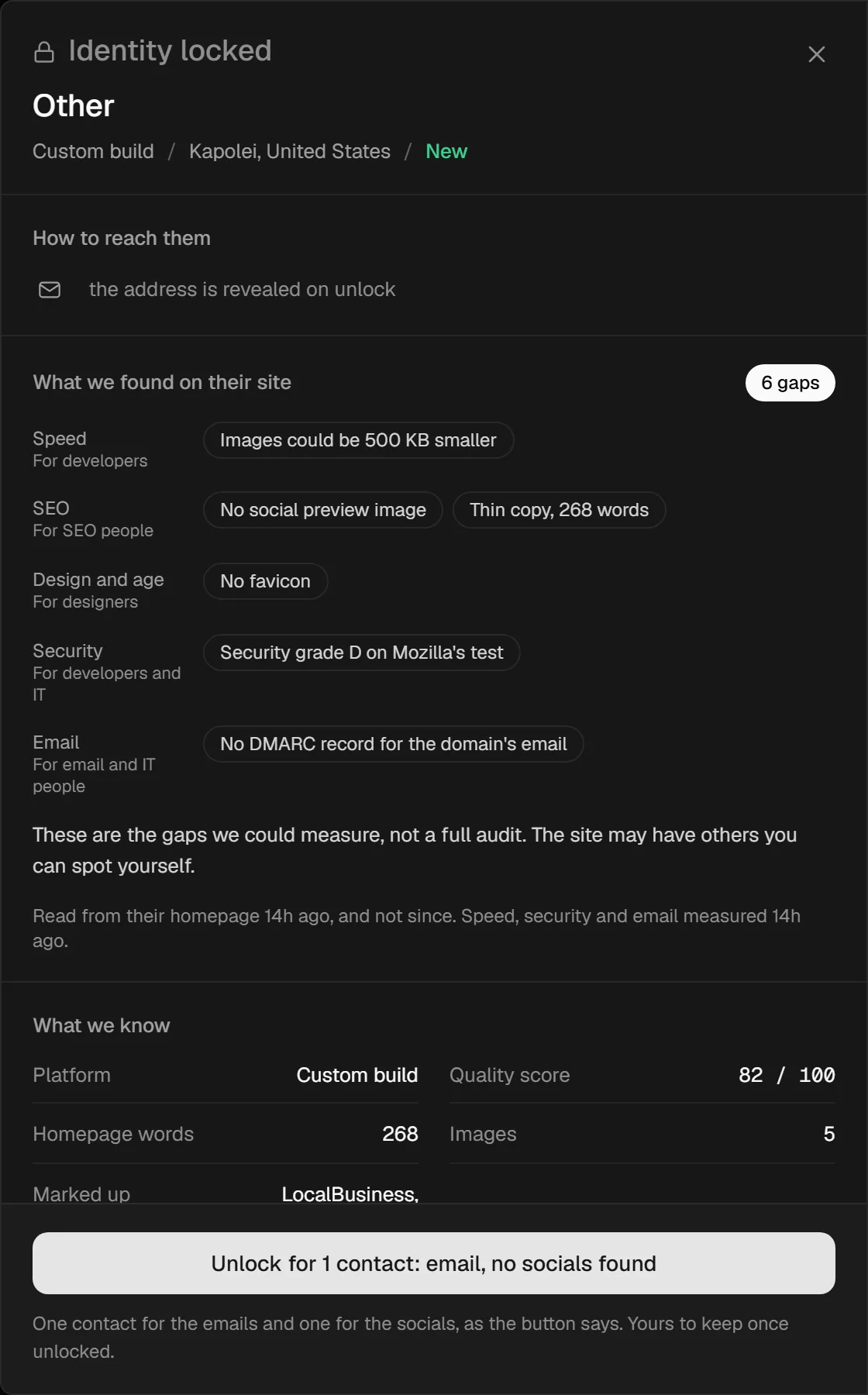
You can try it free with 3 contacts and the newest 50 leads each day, no card. If you work mostly with web design prospects, the page for finding web design clients shows how designers use the feed, and our cold email templates for web design cover what to send next.
What can you send before lunch today?
You do not need a big list to start. Today, pick one niche and one town, find three businesses with a site that shows at least two flaws from the table, check each one is still trading, find a real email for the owner, and send three short emails that each name one problem. Tomorrow, do the same with three more.
If you would rather start with sites that launched this week, already checked and with a verified email, open Vetted Leads and use your 3 free contacts.
Questions people ask
How do I know if a business needs a website redesign?
Look for problems you can see from the homepage: an old copyright year, a "Not secure" warning from pages loading over plain http, a slow load on a phone, no meta description (so Google shows a menu or cookie notice under its result), or a blank browser tab icon. Then check the business is still trading, through recent reviews or social posts, before you pitch.
Where can I find businesses that need web design for free?
Google search for a niche and a town, Google Maps listings with a website link, local directories, and the public certificate logs for sites that just launched. PageSpeed Insights and the Wayback Machine help you check a shortlist for slow pages and sites nobody has updated in years.
Should I pitch a full redesign or a small fix first?
It depends on the business. An established business with a tired site can often afford a redesign if you show it what the old site is costing. A business that launched last week rarely has that budget, so a small paid fix, such as setting its meta description or social preview image, is a better first step.
Is it okay to cold email a business about its website?
The rules on emailing businesses differ by country, and many places allow a relevant, one-to-one message to a business address. Write to one business at a time, say who you are, mention something real about their site, and stop if they ask you to. Check the rules where the business is based before you send in volume.
How many redesign prospects should I contact a day?
Quality matters more than volume. Three to five well-researched emails a day, each naming a specific problem on that business's site, give you something real to say, and they keep your sending domain out of spam.
Does Vetted Leads find old websites that need a redesign?
No. It finds businesses whose website went live in the last few days, checks they are real, lists their homepage gaps and verifies the email. Those are often rushed launches that need fixes or a proper rebuild. You can try it with 3 free contacts, no card, at [vettedleads.app](/).